How to export and import Windows registry keys
Latest update: October 12, 2021
ID: 8576
In some cases, e.g. in case of virus infection, you may have to delete or edit some registry keys. Before doing that, create a backup copy: export the registry or some of the keys to a file. This will help you restore the previous state of the system registry.
How to export a registry key
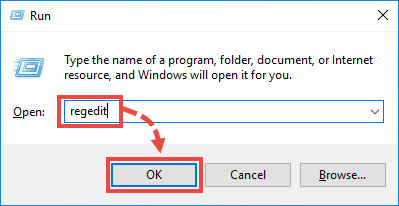
- Press
 +R on the keyboard.
 - Type regedit and click OK.
- Enter your administrator password and confirm your actions, if requested.
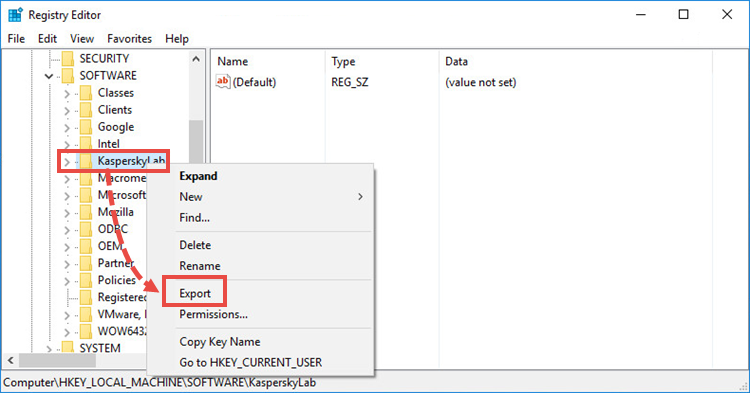
- If the left frame, right-click the registry section you would like to export and select Export in the context menu.
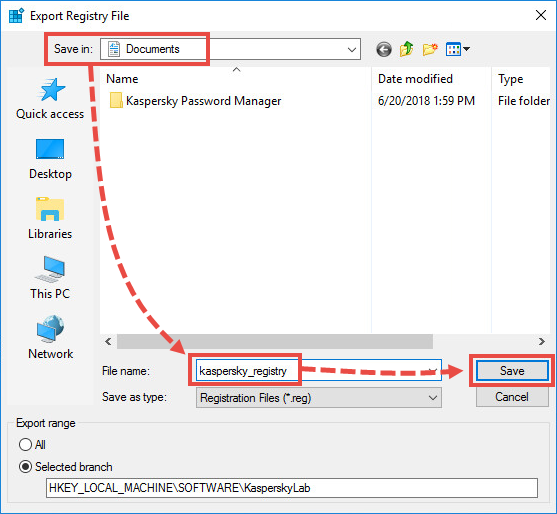
- Select the folder where it will be saved and click Save.
- Close the registry editor.
The registry keys have been exported.
How to import a registry key
- Run the file with the registry keys that you have exported earlier.
- Enter your administrator password and confirm your actions, if requested.
- Click Yes.
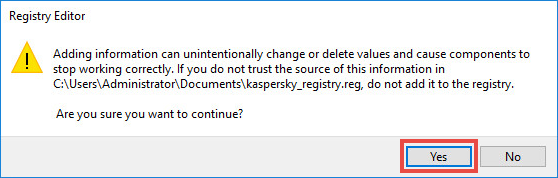
- Click OK.

The registry keys have been imported.