How to get the dump file of a process in Windows 7, 8, 8.1, 10, 11 or Windows Server 2008, 2012, 2016, 2019
Latest update: July 11, 2022
ID: 12401
In some cases, Kaspersky support engineers may request a dump file of a certain process to fix the issue.
To get the process dump file:
- Press Ctrl+Alt+Delete on the keyboard.
- Select Task Manager.
- If you are using:
- Windows 7, go to the Processes tab.
- Windows 11, the Processes tab will be opened by default. Proceed to the next step.
-
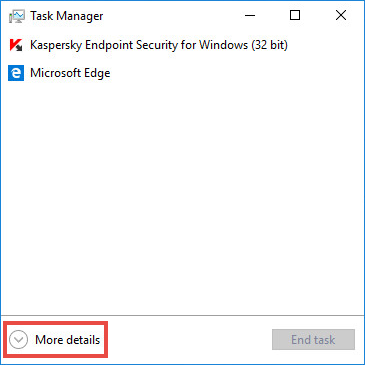
Windows 8, 8.1, 10 or Windows Server 2008, click More details.
-
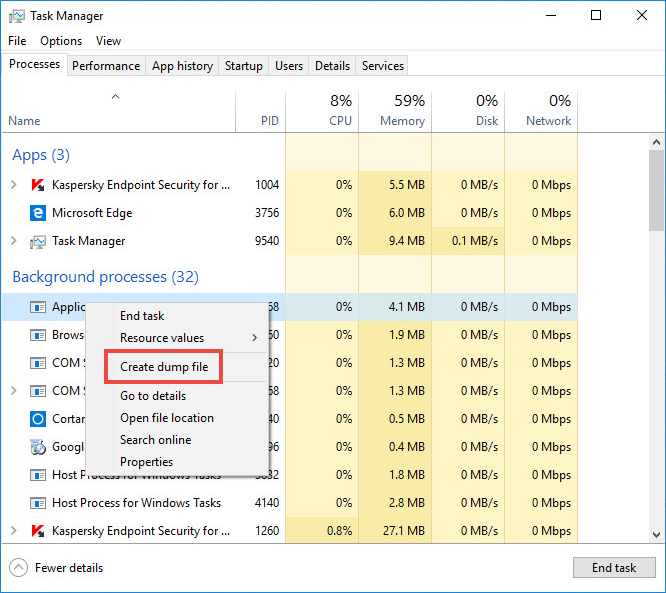
- Right-click the process for which you need to create a dump file. Select Create Dump File.
- Wait until you get the notification on successful creation of the file.
- Copy the path to the dump file.
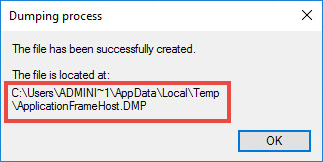
- Click OK.
- Press
 +E combination on your keyboard.
 - Paste the copied path to the folder to the address line.
- Press Enter on the keyboard.
The folder with the dump file will open.