How to get installation and removal trace files for Kaspersky applications
If the installation or removal of a Kaspersky home application terminates with an error, please get trace files of the process to help Customer Service diagnose the issue.
Installation and removal trace files are created automatically in Kaspersky applications. By default, the files are saved to the %temp% folder (usually C:\Windows\Temp or C:\Documents and Settings\<profile name>\LocalSettings\Temp) with the names of the following type:
- kl-install-yyyy-mm-dd-hh-mm-ss.log
- kl-setup-yyyy-mm-dd-hh-mm-ss.log
How to locate the trace files
To locate trace files of the installation/removal process:
- Press
 +R on your keyboard.
 - Enter %TEMP% and click OK.
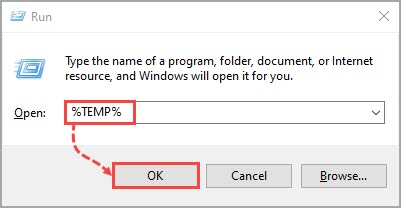
- In the open dialog window of the %TEMP% folder, find the file named the following way: kl-install-<installation date>-<installation time>.log.
In Windows Vista, Windows Installer version 4.0 is installed by default. If you are using Windows Vista or Windows Installer version 4.0, removal trace files are saved under the name MSI<charset>.log (for example, MSI8ba62.LOG) to the %TEMP% folder.
What to do if the trace files were not created
If trace files were not created automatically for some reason, please enable tracing manually. To do so:
- Download the MSI_log.zip archive.
- Extract all files from the archive.
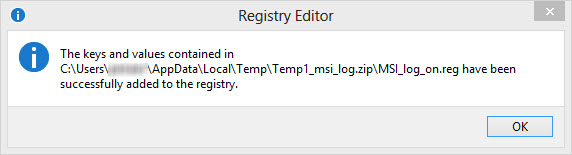
- Run the MSI_log_on.reg file to add the necessary key to the registry and click Yes. As a result, a window will appear confirming that information was successfully added to the registry.
- Start the installation or removal of the Kaspersky application.
- Reproduce the issue and wait until the installation/removal error appears.
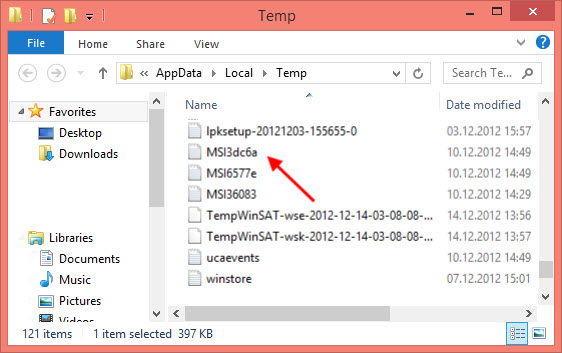
- As a result, an installer log text file named MSI*.log will be generated (where * stands for a random set of alphanumeric symbols). The file is saved to the Temp system folder. By default, the Temp folder is located at:
- On Windows Vista, 7, 8, 8.1, 10, 11 — \Users\%USERPROFILE%\AppData\Local\Temp
- On Windows XP — \Documents and Settings\%USERPROFILE%\Local Settings\Temp
- Run the MSI_log_off.reg file and click Yes. Installation/removal tracing will be disabled.
Trace files are created during both the installation and removal of the application, and each time the file is given a unique name. If MSI*.log files already exist in the the Temp folder as a result of previous installations, you can find the file you need by looking for the most recent creation date.
How to submit a request to Customer Service
If you experience any difficulties installing a Kaspersky application, submit a request to Kaspersky Customer Service.
Please attach installation report files to your request:
- For Windows 10, 11 users — setupapi.setup.log and setupapi.dev.log, located in the folder \Windows\inf
- For Windows Vista, 7, 8, 8.1 users — setupapi.app.log and setupapi.dev.log, located in the folder \Windows\inf
- For Windows XP users — setupapi.log, located in the folder \Windows