How to start On-Screen Keyboard
You can open On-Screen Keyboard in the following ways:
- From the context menu of the application icon in the taskbar notification area
- From the application window
- From the toolbar of Microsoft Internet Explorer, Mozilla Firefox, or Google Chrome
- By pressing a combination of keyboard keys
To open On-Screen Keyboard from the context menu of the application icon in the taskbar notification area:
Select On-Screen Keyboard (see figure below).
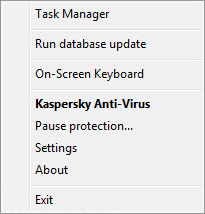
Kaspersky Anti-Virus context menu
To open On-Screen Keyboard from the application window:
- Open the main application window.
- Click the On-Screen Keyboard button.
To open On-Screen Keyboard from the toolbar of Google Chrome, Microsoft Internet Explorer or Mozilla Firefox:
- Click the
 Kaspersky Protection button on the browser toolbar.
 - Select the On-Screen Keyboard item in the menu that opens.
To open the On-Screen Keyboard by using the hardware keyboard:
Press the shortcut CTRL+ALT+SHIFT+P.
Page top