TOTP authorization
TOTP authorization (Time-based One-Time Password) is a method of authorization a user in the service by requesting authentication data of two types. In addition to email and password, one-time code that is valid for a limited period of time is requested. The main feature of TOTP is the generation of a code based on a combination of the current time and a secret key.
This authorization method provides an additional two-step account protection against a hack. Moreover, TOTP authorization does not require Internet access to generate a code, what makes it versatile.
To enable TOTP authorization, follow these steps:
- Download any application that generates one-time codes, such as Google Authenticator (download links for Android and IOS).
- Go to Users → Profile section.
- Click the
 switcher. The following pop-up window appears: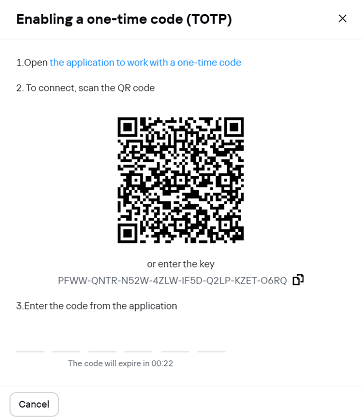
- Open the application you downloaded in the first step and scan QR code. A one-time code will be generated in the application.
- In the pop-up window in the corresponding field, enter the generated code. TOTP authorization will be enabled.
Enabling TOTP authorization adds one more step to the sign-in process. After entering user's email and password, a one-time code entry screen displays:
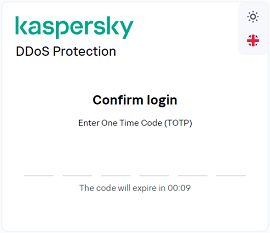
In the corresponding field, enter the one-time code generated by the application and click Confirm.
Page top