Managing policies
A policy is a collection of application settings that are defined for an administration group. You can configure multiple policies with different values for one application. An application can run under different settings for different administration groups. Each administration group can have its own policy for an application.
Each policy setting has the  ("padlock") attribute. The status of this attribute determines whether the setting will be passed to the managed devices in the administration group:
- If the "padlock" is open (
 ), the value of this setting will not be passed to the managed devices. The setting will be available for modification in the local interface of the application. Such settings are referred to as unlocked.
 - If the "padlock" is closed (), the value of this setting will be passed and applied to the managed devices. Such settings are referred to as locked. Blocked settings are not available for modification in the local interface of the application.
Policy settings are sent to client computers by Network Agent during synchronization. By default, the Administration Server performs synchronization immediately after policy settings are changed. UDP port 15000 on the client computer is used for synchronization. The Administration Server performs synchronization every 15 minutes by default. If synchronization fails after policy settings were changed, the next synchronization attempt will be performed according to the configured schedule.
Settings inheritance
Policies, like administration groups, are arranged in a hierarchy. Child policy is a policy for nested hierarchy levels, that is a policy for nested administration groups and secondary Administration Servers.
By default, a child policy inherits settings from the parent policy. If the setting in the parent policy has the (closed "padlock") attribute, then in child policies and local application settings, the value of that setting will be overridden in accordance with the parent policy, and the setting will be locked. If necessary, you can disable the inheritance of settings from the parent policy. Out-of-office policies do not affect other policies through the hierarchy of administration groups.
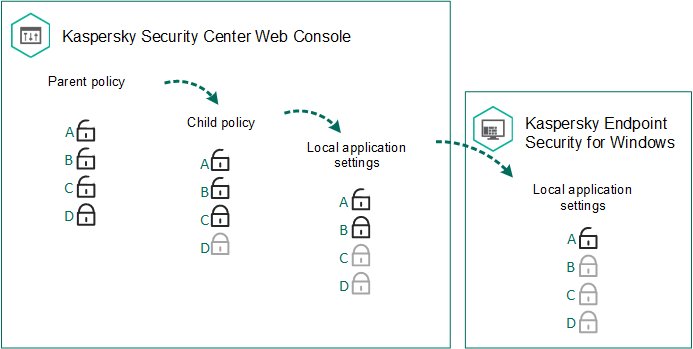
Settings inheritance
The rights to access policy settings (read, write, execute) are specified for each user who has access to the Kaspersky Security Center Administration Server and separately for each functional scope of Kaspersky Endpoint Security. To configure access rights to policy settings, go to the Security section of the properties window of Kaspersky Security Center Administration Server (by default, this section is hidden in the console interface).