Security level indicator
The security level indicator is displayed in the upper part of the properties window. The indicator can take one of the following values:
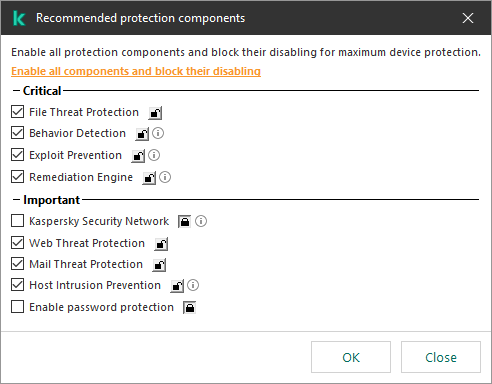
- High protection level. The indicator takes this value and turns green if all components from the following categories are enabled:
- Critical. This category includes the following components:
- Important. This category includes the following components:
- Medium protection level. The indicator takes this value and turns yellow if one of the important components is disabled.
- Low protection level. The indicator takes this value and turns red in one of the following cases:
- One or multiple critical components are disabled.
- Two ore more important components are disabled.
If the indicator has the Medium protection level or Low protection level value, a link that opens the Incidents window appears to the right of the indicator. In this window, you can enable any of the recommended protection components.
Security level indicator of the policy
Page top