How to pause and resume computer protection
Pausing protection means temporarily disabling all protection components for some time.
To pause the protection of your computer:
- In the context menu of the application icon located in the taskbar notification area, select the Pause protection item.
The Pause protection window opens (see the following figure).
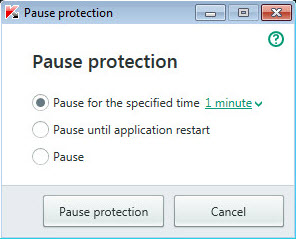
Pause protection window
- In the Pause protection window, select the time interval after which protection will be resumed:
- Pause for the specified time – protection is enabled after expiration of the time interval selected from the drop-down list.
- Pause until computer restart – protection is enabled after the application is started again or the operating system is restarted (if the application automatically starts on startup).
- Pause – protection will be resumed when you decide to resume it.
- Click the Pause protection button and confirm your choice in the window that opens.
To resume computer protection:
In the taskbar notification area, in the context menu of the application icon, select Resume protection.