Upgrading Kaspersky Security Center Linux on the Kaspersky Security Center Linux failover cluster nodes
You can install Administration Server version 15 on every Kaspersky Security Center Linux failover cluster node where the Administration Server with an earlier version is installed (starting from version 14). When upgrading to version 15, all data and settings from the previous version of Administration Server are preserved.
If you previously installed Kaspersky Security Center Linux on devices locally, you can also upgrade Kaspersky Security Center Linux on these devices by using the installation file or through backup.
To upgrade Kaspersky Security Center Linux on the Kaspersky Security Center Linux failover cluster nodes:
- Download the Kaspersky Security Center Linux installation file with a full package for version 15 from the Kaspersky website:
- For devices running an RPM-based operating system—ksc64-<version number>-<build number>.x86_64.rpm
- For devices running a Debian-based operating system—ksc64_<version number>-<build number>_amd64.deb
- Stop the cluster.
- On the active node of the cluster upgrade the installation package by using a package manager that you use on your Administration Server.
For example, you can use the following commands in the command-line terminal under an account with root privileges:
- For devices running an RPM-based operating system:
$ sudo yum install ./ksc64-<
version number>-<build number>.x86_64.rpm - For devices running a Debian-based operating system:
$
sudo apt-get install ./ksc64_<version number>-<build number>_amd64.deb
After the command has been successfully executed, the /opt/kaspersky/ksc64/lib/bin/setup/postinstall.pl script is created. The message about that is displayed in the terminal.
- For devices running an RPM-based operating system:
- Under an account with root privileges, run the /opt/kaspersky/ksc64/lib/bin/setup/postinstall.pl script to configure the upgraded Administration Server.
- Read the License Agreement and Privacy Policy, which appear in the command-line terminal. If you agree with all of the terms of the License Agreement and Privacy Policy:
- Enter 'Y' to confirm that you have fully read, understood, and accept the terms and conditions of the EULA.
- Enter 'Y' again to confirm that you have fully read, understood, and accept the Privacy Policy that describes the handling of data.
Installation of the application on your device will continue after you have entered 'Y' twice.
- Select the node on which you are upgrading by entering '2'.
The picture below shows the last two steps.
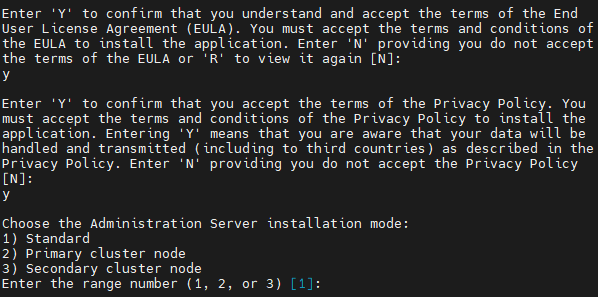
Accepting the terms of the EULA and the Privacy Policy, and selecting the installation mode in the command-line terminal
Next, the script configures and finishes upgrading the Administration Server. During the upgrade, you cannot change the Administration Server settings adjusted before the upgrade.
- Perform steps 3-5 on the passive node.
At step 6, enter '3' to select the node.
- Start the cluster.
Note that you can start the cluster on any node. If you start the cluster on the passive node, it becomes the active node.
As a result, you installed the Administration Server of the latest version on the Kaspersky Security Center Linux failover cluster nodes.