Mapping Tigerpaw price book items to products
Set up mapping between Tigerpaw price book items and Kaspersky Lab products, so that usage information about Kaspersky Lab products appears in Tigerpaw as additional charges to the agreements of the accounts.
On the Price book items tab of the Kaspersky Security Integration Tool for MSP window, you can map Kaspersky Lab products to Tigerpaw price book items. You can edit existing mapping between products and price book items as well.
The list of available products differs depending on which Kaspersky Lab solution that you use—Kaspersky Security Center or Kaspersky Endpoint Security Cloud.
Create price book items in Tigerpaw for the Kaspersky Lab products that you provide to your clients before setting up mapping.
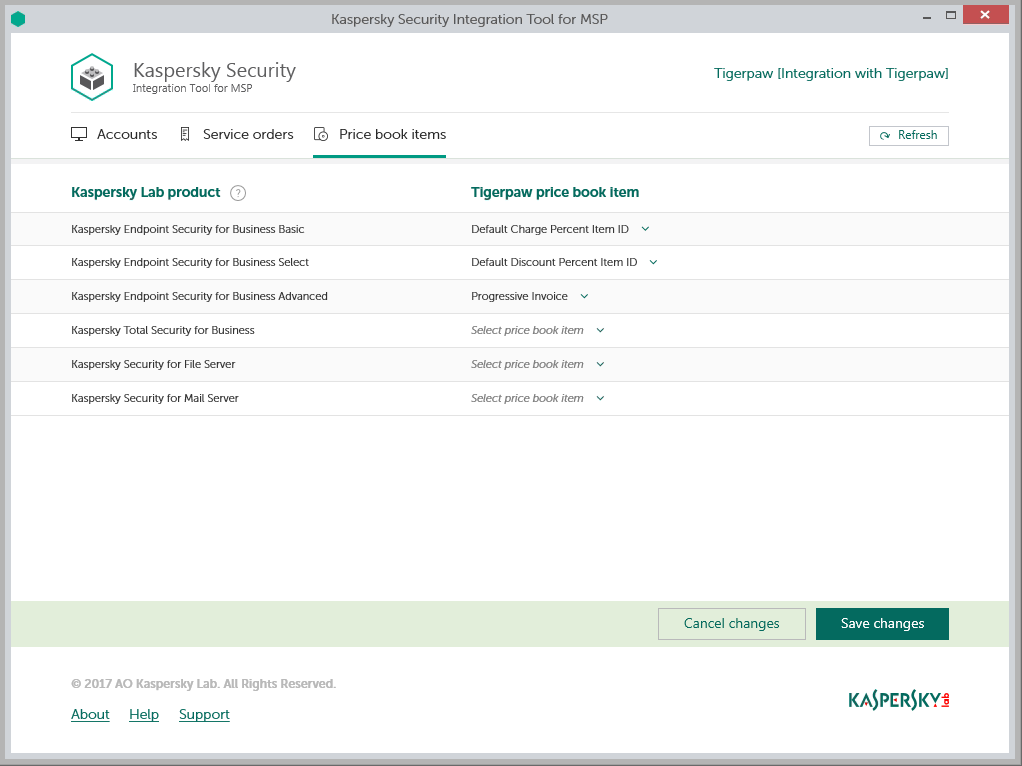
Mapping Tigerpaw price book items to Kaspersky Lab products
To set up mapping between Kaspersky Lab products and Tigerpaw price book items:
- In the Kaspersky Security Integration Tool for MSP window, click the Price book items tab.
- Map a Kaspersky Lab product in the Kaspersky Lab product column to a Tigerpaw price book item in the Price book items column.
One Kaspersky Lab product can be mapped to one Tigerpaw price book item only.
- When you have finished with mapping, click the Save changes button.