Creating an exclusion by type of detected objects
Kaspersky Endpoint Security classifies detected objects as follows:
- Viruses and worms
Subcategory: Viruses and worms (Viruses_and_Worms)
Danger level: High
Classic viruses and worms perform actions that are not authorized by the user. They can create copies of themselves which are able to self-replicate.
Classic virus
When a classic virus infiltrates a computer, it infects a file, activates, performs malicious actions, and adds copies of itself to other files.
A classic virus multiplies only on local resources of the computer; it cannot penetrate other computers on its own. It can be passed to another computer only if it adds a copy of itself to a file that is stored in a shared folder or on an inserted CD, or if the user forwards an email message with an attached infected file.
Classic virus code can penetrate various areas of computers, operating systems, and applications. Depending on the environment, viruses are divided into file viruses, boot viruses, script viruses, and macro viruses.
Viruses can infect files by using a variety of techniques. Overwriting viruses write their code over the code of the file that is infected, thus erasing the content of the file. The infected file stops functioning and cannot be restored. Parasitic viruses modify files, leaving them fully or partially functional. Companion do not modify files, but instead create duplicates. When an infected file is opened, a duplicate of it (what is actually a virus) is started. The following types of viruses are also encountered: Link viruses, OBJ viruses, LIB viruses, source code viruses, and many others.
Worm
As with a classic virus, the code of a worm is activated and performs malicious actions after it infiltrates a computer. Worms are so named because of their ability to "crawl" from one computer to another and to spread copies via numerous data channels without the user's permission.
The main feature that allows differentiating between various types of worms is the way they spread. The following table provides an overview of various types of worms, which are classified by the way in which they spread.
Ways in which worms spread
Type
Name
Description
Email-Worm
Email-Worm
They spread via email.
An infected email message contains an attached file with a copy of a worm, or a link to a file that is uploaded to a website which may have been hacked or created exclusively for that purpose. When you open the attached file, the worm is activated. When you click the link, download, and then open the file, the worm also starts performing its malicious actions. After that, it goes on spreading copies of itself, searching for other email addresses and sending infected messages to them.
IM-Worm
IM client worms
They spread through IM clients.
Usually, such worms send messages that contain a link to a file with a copy of the worm on a website, making use of the user's contact lists. When the user downloads and opens the file, the worm activates.
IRC-Worm
Internet chat worms
They spread via Internet Relay Chats, service systems which allow communicating with other people over the Internet in real time.
These worms publish a file with a copy of themselves or a link to the file in an Internet chat. When the user downloads and opens the file, the worm activates.
Net-Worm
Network worms
These worms spread over computer networks.
Unlike other types of worms, a typical network worm spreads without the user's participation. It scans the local network for computers that contain programs with vulnerabilities. To do this, it sends a specially formed network packet (exploit) which contains the worm code or a part of it. If a "vulnerable" computer is on the network, it receives such a network packet. When the worm completely penetrates the computer, it activates.
P2P-Worm
File sharing network worms
They spread over peer-to-peer file sharing networks.
To infiltrate a P2P network, the worm copies itself into a file sharing folder which is usually located on the user's computer. The P2P network displays information about this file so that the user may "find" the infected file on the network like any other file, and then download and open it.
More sophisticated worms emulate the network protocol of a specific P2P network: they return positive responses to search queries and offer copies of themselves for download.
Worm
Other types of worms
Other types of worms include:
- Worms that spread copies of themselves over network resources. By using the functions of the operating system, they scan available network folders, connect to computers on the Internet, and attempt to obtain full access to their disk drives. Unlike the previously described types of worms, other types of worms activate not on their own, but when the user opens a file that contains a copy of the worm.
- Worms that do not use any of the methods described in the previous table to spread (for example, those that spread over cell phones).
- Trojans (including ransomware)
Subcategory: Trojans
Danger level: High
Unlike worms and viruses, Trojans do not self-replicate. For example, they penetrate a computer via email or a browser when the user visits an infected web page. Trojans are started with the user's participation. They begin performing their malicious actions right after they are started.
Different Trojans behave differently on infected computers. The main functions of Trojans consist in blocking, modifying, or destroying information, and disabling computers or networks. Trojans can also receive or send files, run them, display messages on the screen, request web pages, download and install programs, and restart the computer.
Hackers often use "sets" of various Trojans.
Types of Trojan behavior are described in the following table.
Types of Trojan behavior on an infected computer
Type
Name
Description
Trojan-ArcBomb
Trojans – "archive bombs"
When unpacked, these archives grow in size to such an extent that the computer's operation is impacted.
When the user attempts to unpack such an archive, the computer may slow down or freeze; the hard disk may become filled with "empty" data. "Archive bombs" are especially dangerous to file and mail servers. If the server uses an automatic system to process incoming information, an "archive bomb" may halt the server.
Backdoor
Trojans for remote administration
They are considered the most dangerous type of Trojan. In their functions, they are similar to remote administration applications that are installed on computers.
These programs install themselves on the computer without being noticed by the user, allowing the intruder to manage the computer remotely.
Trojan
Trojans
They include the following malicious applications:
- Classic Trojans. These programs perform only the main functions of Trojans: blocking, modifying or destroying information, and disabling computers or networks. They do not have any advanced features, unlike the other types of Trojans that are described in the table.
- Versatile Trojans. These programs have advanced features typical of several types of Trojans.
Trojan-Ransom
Ransom Trojans
They take the user's information "hostage", modifying or blocking it, or impact the computer's operation so that the user loses the ability to use information. The intruder demands a ransom from the user, promising to send an application to restore the computer's performance and the data that had been stored on it.
Trojan-Clicker
Trojan clickers
They access web pages from the user's computer, either by sending commands to a browser on their own or by changing the web addresses that are specified in operating system files.
By using these programs, intruders perpetrate network attacks and increase website visits, increasing the number of displays of banner ads.
Trojan-Downloader
Trojan downloaders
They access the intruder's web page, download other malicious applications from it, and install them on the user's computer. They can contain the file name of the malicious application to download, or receive it from the web page that is accessed.
Trojan-Dropper
Trojan droppers
They contain other Trojans which they install on the hard drive and then install.
Intruders may use Trojan Dropper–type programs for the following goals:
- Install a malicious application without being noticed by the user: Trojan Dropper–type programs display no messages, or display fake messages which inform, for example, of an error in an archive or an incompatible version of the operating system.
- Protect another known malicious application from detection: not all anti-virus software can detect a malicious application within a Trojan Dropper–type application.
Trojan-Notifier
Trojan notifiers
They inform an intruder that the infected computer is accessible, sending the intruder information about the computer: IP address, number of opened port, or email address. They connect with the intruder via email, FTP, accessing the intruder's web page, or in another way.
Trojan Notifier–type programs are often used in sets that are made of several Trojans. They notify the intruder that other Trojans have been successfully installed on the user's computer.
Trojan-Proxy
Trojan proxies
They allow the intruder to anonymously access web pages by using the user's computer; they are often used for sending spam.
Trojan-PSW
Password-stealing-ware
Password-stealing-ware is a kind of Trojan that steals user accounts, such as software registration data. These Trojans find confidential data in system files and in the registry and send it to the "attacker" by email, via FTP, by accessing the intruder's web page, or in another way.
Some of these Trojans are categorized into separate types that are described in this table. These are Trojans that steal bank accounts (Trojan-Banker), steal data from users of IM clients (Trojan-IM), and steal information from users of online games (Trojan-GameThief).
Trojan-Spy
Trojan spies
They spy on the user, collecting information about the actions that the user makes while working at the computer. They may intercept the data that the user enters at the keyboard, take screenshots, or collect lists of active applications. After they receive the information, they transfer it to the intruder by email, via FTP, by accessing the intruder's web page, or in another way.
Trojan-DDoS
Trojan network attackers
They send numerous requests from the user's computer to a remote server. The server lacks resources to process all requests, so it stops functioning (Denial of Service, or simply DoS). Hackers often infect many computers with these programs so that they can use the computers to attack a single server simultaneously.
DoS programs perpetrate an attack from a single computer with the user's knowledge. DDoS (Distributed DoS) programs perpetrate distributed attacks from several computers without being noticed by the user of the infected computer.
Trojan-IM
Trojans that steal information from users of IM clients
They steal account numbers and passwords of IM client users. They transfer the data to the intruder by email, via FTP, by accessing the intruder's web page, or in another way.
Rootkit
Rootkits
They mask other malicious applications and their activity, thus prolonging the applications' persistence in the operating system. They can also conceal files, processes in an infected computer's memory, or registry keys which run malicious applications. The rootkits can mask data exchange between applications on the user's computer and other computers on the network.
Trojan-SMS
Trojans in the form of SMS messages
They infect cell phones, sending SMS messages to premium-rate phone numbers.
Trojan-GameThief
Trojans that steal information from users of online games
They steal account credentials from users of online games, after which they send the data to the intruder by email, via FTP, by accessing the intruder's web page, or in another way.
Trojan-Banker
Trojans that steal bank accounts
They steal bank account data or e-money system data; send the data to the hacker by email, via FTP, by accessing the hacker's web page, or by using another method.
Trojan-Mailfinder
Trojans that collect email addresses
They collect email addresses that stored on a computer and send them to the intruder by email, via FTP, by accessing the intruder's web page, or in another way. Intruders may send spam to the addresses they have collected.
- Malicious tools
Subcategory: Malicious tools
Danger level: Medium
Unlike other types of malware, malicious tools do not perform their actions right after they are started. They can be safely stored and started on the user's computer. Intruders often use the features of these programs to create viruses, worms, and Trojans, perpetrate network attacks on remote servers, hack computers, or perform other malicious actions.
Various features of malicious tools are grouped by the types that are described in the following table.
Features of malicious tools
Type
Name
Description
Constructor
Constructors
They allow creating new viruses, worms, and Trojans. Some constructors boast a standard window-based interface in which the user can select the type of malicious application to create, the way of counteracting debuggers, and other features.
Dos
Network attacks
They send numerous requests from the user's computer to a remote server. The server lacks resources to process all requests, so it stops functioning (Denial of Service, or simply DoS).
Exploit
Exploits
An exploit is a set of data or a program code that uses vulnerabilities of the application in which it is processed, performing a malicious action on a computer. For example, an exploit can write or read files, or request "infected" web pages.
Different exploits use vulnerabilities in different applications or network services. Disguised as a network packet, an exploit is transmitted over the network to numerous computers, searching for computers with vulnerable network services. An exploit in a DOC file uses the vulnerabilities of a text editor. It may start performing the actions that are preprogrammed by the hacker when the user opens the infected file. An exploit that is embedded in an email message searches for vulnerabilities in any email client. It may start performing a malicious action as soon as the user opens the infected message in this email client.
Net-Worms spread over networks by using exploits. Nuker exploits are network packets that disable computers.
FileCryptor
Encryptors
They encrypt other malicious applications to conceal them from the anti-virus application.
Flooder
Programs for "contaminating" networks
They send numerous messages over network channels. This type of tools includes, for example, programs that contaminate Internet Relay Chats.
Flooder-type tools do not include programs that "contaminate" channels that are used by email, IM clients, and mobile communication systems. These programs are distinguished as separate types that are described in the table (Email-Flooder, IM-Flooder, and SMS-Flooder).
HackTool
Hacking tools
They make it possible to hack the computer on which they are installed or attack another computer (for example, by adding new system accounts without the user's permission or by erasing system logs to conceal traces of their presence in the operating system). This type of tools includes some sniffers which feature malicious functions, such as password interception. Sniffers are programs that allow viewing network traffic.
Hoax
Hoaxes
They alarm the user with virus-like messages: they may "detect a virus" in an uninfected file or notify the user that the disk has been formatted, although this has not happened in reality.
Spoofer
Spoofing tools
They send messages and network requests with a fake address of the sender. Intruders use Spoofer-type tools to pass themselves off as the true senders of messages, for example.
VirTool
Tools that modify malicious applications
They allow modifying other malware programs, concealing them from anti-virus applications.
Email-Flooder
Programs that "contaminate" email addresses
They send numerous messages to various email addresses, thus "contaminating" them. A large volume of incoming messages prevents users from viewing useful messages in their inboxes.
IM-Flooder
Programs that "contaminate" traffic of IM clients
They flood users of IM clients with messages. A large volume of messages prevents users from viewing useful incoming messages.
SMS-Flooder
Programs that "contaminate" traffic with SMS messages
They send numerous SMS messages to cell phones.
- Adware
Subcategory: Advertising software (Adware)
Danger level: Medium
Adware displays advertising information to the user. Adware programs display banner ads in the interfaces of other programs and redirect search queries to advertising web pages. Some of them collect marketing information about the user and send it to the developer: this information may include the names of the websites that are visited by the user or the content of the user's search queries. Unlike Trojan-Spy–type programs, adware sends this information to the developer with the user's permission.
- Auto-dialers
Subcategory: Auto-dialers (Dialer).
Danger level: Medium
Auto-dialers can surreptitiously establish phone connections using a modem.
- Legitimate software that can be used by intruders to damage your computer or personal data
Subcategory: Legitimate software that can be used by intruders to damage your computer or personal data.
Danger level: Medium
Most of these applications are useful, so many users run them. These applications include IRC clients, auto-dialers, file download programs, computer system activity monitors, password utilities, and internet servers for FTP, HTTP, and Telnet.
However, if intruders gain access to these programs, or if they plant them on the user's computer, some of the application's features may be used to violate security.
These applications differ by function; their types are described in the following table.
Type
Name
Description
Client-IRC
Internet chat clients
Users install these programs to talk to people in Internet Relay Chats. Intruders use them to spread malware.
Downloader
Programs for downloading
They can download files from web pages in hidden mode.
Monitor
Programs for monitoring
They allow monitoring activity on the computer on which they are installed (seeing which applications are active and how they exchange data with applications that are installed on other computers).
PSWTool
Password restorers
They allow viewing and restoring forgotten passwords. Intruders secretly implant them on users' computers with the same purpose.
RemoteAdmin
Remote administration programs
They are widely used by system administrators. These programs allow obtaining access to the interface of a remote computer to monitor and manage it. Intruders secretly implant them on users' computers with the same purpose: to monitor and manage remote computers.
Legal remote administration programs differ from backdoor-type Trojans for remote administration. Trojans have the ability to penetrate the operating system independently and install themselves; legal programs are unable to do so.
Server-FTP
FTP servers
They function as FTP servers. Intruders implant them on the user's computer to open remote access to it via FTP.
Server-Proxy
Proxy servers
They function as proxy servers. Intruders implant them on the user's computer to send spam under the user's name.
Server-Telnet
Telnet servers
They function as Telnet servers. Intruders implant them on the user's computer to open remote access to it via Telnet.
Server-Web
Web servers
They function as web servers. Intruders implant them on the user's computer to open remote access to it via HTTP.
RiskTool
Tools for working at a local computer
They provide the user with additional options when working at the user's own computer. The tools allow the user to hide files or windows of active applications and terminate active processes.
NetTool
Network tools
They provide the user with additional options when working with other computers on the network. These tools allow restarting them, detecting open ports, and starting applications that are installed on the computers.
Client-P2P
P2P network clients
They allow working on peer-to-peer networks. They can be used by intruders for spreading malware.
Client-SMTP
SMTP clients
They send email messages without the user's knowledge. Intruders implant them on the user's computer to send spam under the user's name.
WebToolbar
Web toolbars
They add toolbars to the interfaces of other applications to use search engines.
FraudTool
Pseudo-programs
They pass themselves off as other programs. For example, there are pseudo-anti-virus programs that display messages about malware detection. However, in reality, they do not find or disinfect anything.
- Packed objects whose packing may be used to protect malicious code
Subcategory: Packed files that may cause harm.
Danger level: Medium.
The file is packed using a special packer that is used for packing malware: viruses, worms, Trojans. Kaspersky Endpoint Security scans the unpacker module within SFX (self-extracting) archives.
To hide malware from detection by an anti-virus, hackers pack it using special packers. Kaspersky experts have identified packers that are the most popular amongst hackers.
- Multi-packed objects
Subcategory: Multi-packed files.
Danger level: Medium.
The file is packed with one or more packers three or more times.
To hide malware from detection by an anti-virus, hackers may pack a file multiple times. Kaspersky Endpoint Security scans packed files.
By default, Kaspersky Endpoint Security detects all types of objects. We recommend leaving the detection of all types of objects enabled to improve the security of the computer. If you are using in-house utilities that the application detects as malicious, add these utilities to an exclusion list, but do not disable the detection of the whole type of objects.
How to select types of detectable objects in the Administration Console (MMC)
- Open the Kaspersky Security Center Administration Console.
- In the console tree, select Policies.
- Select the necessary policy and double-click to open the policy properties.
- In the policy window, select General settings → Exclusions and object types.
- In the Types of detected objects block, click the Settings button.
- In the window that opens, select check boxes opposite the types of objects that you want Kaspersky Endpoint Security to detect.
- Save your changes. To apply the policy on computers, close the padlocks
 .
.
How to select types of detectable objects in the Web Console and Cloud Console
- In the main window of the Web Console, select the Assets (Devices) → Policies & profiles tab.
- Click the name of the Kaspersky Endpoint Security policy.
The policy properties window opens.
- Select the Application settings tab.
- Go to General Settings → Detection Settings.
- In the Detection of other types of objects block, select check boxes opposite the types of objects that you want Kaspersky Endpoint Security to detect.
- Save your changes. To apply the policy on computers, close the padlocks
 .
.
How to select types of detectable objects in the application interface
- In the main application window, click the
 button.
 - In the application settings window, select General settings → Exclusions and types of detected objects.
- In the Types of detected objects block, select check boxes opposite the types of objects that you want Kaspersky Endpoint Security to detect.
- Save your changes.
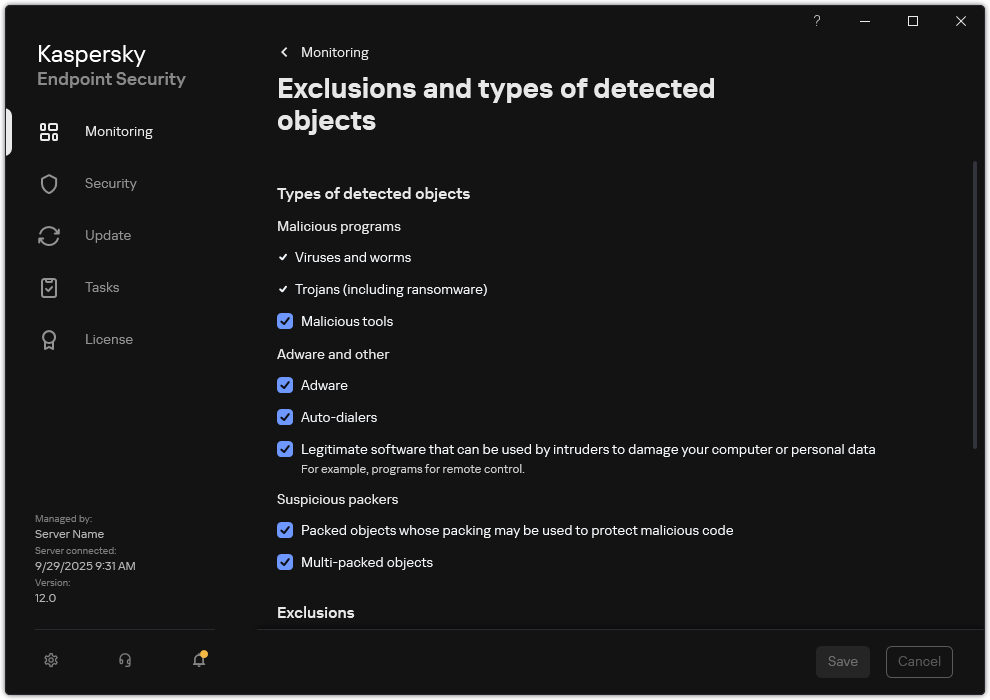
Types of detectable objects
Page top