Creating and using a configuration file
A configuration file with Kaspersky Endpoint Security settings lets you accomplish the following tasks:
- Perform local installation of Kaspersky Endpoint Security via the command line with predefined settings.
- Perform remote installation of Kaspersky Endpoint Security via Kaspersky Security Center with predefined settings.
- Migrate Kaspersky Endpoint Security settings from one computer to another (see the instructions below).
Exporting a configuration file
To create a configuration file:
- In the main application window, click the
 button.
 - In the application settings window, select General settings → Manage settings.
- Click Export.
- In the window that opens, specify the path to where you want to save the configuration file, and enter its name.
To use the configuration file for local or remote installation of Kaspersky Endpoint Security, you must name it install.cfg.
- If necessary, enter a password for exporting application configuration to a file.
To save the configuration file, Password protection must be enabled. The user must have the Settings export permission.
- Save the file.
As a result, the application creates a configuration file. The configuration file may contain user account details, therefore Kaspersky Endpoint Security encrypts the file. You cannot edit a configuration file. Any attempts to modify a configuration file will make it corrupt.
Importing a configuration file
A configuration file may contain the details of user accounts added to the application. If you are importing the file on the same computer where the file was created, Kaspersky Endpoint Security imports the passwords of user accounts. If you are importing the file on a different computer, you need to enter the passwords manually.
To import Kaspersky Endpoint Security settings from a configuration file:
- In the main application window, click the button.
- In the application settings window, select General settings → Manage settings.
- Click Import.
- In the window that opens, enter the path to the configuration file.
- Open the file.
All values of Kaspersky Endpoint Security settings will be set according to the selected configuration file.
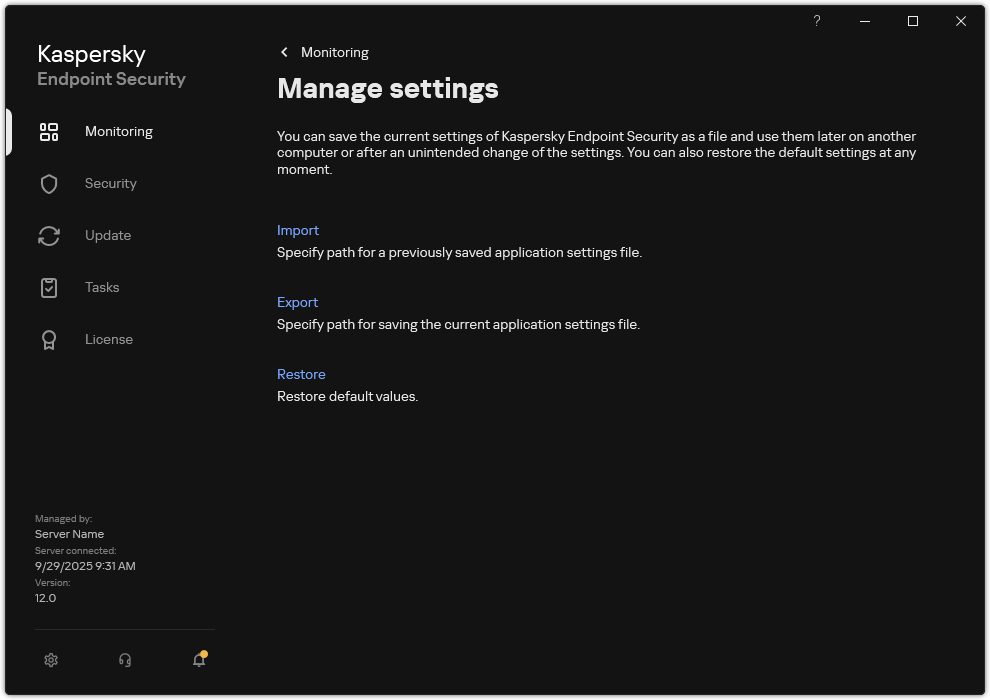
Managing the application settings