Viewing network status information
In the Kaspersky Thin Client interface, you can view the settings for connecting the system to the network and view information regarding the network connection status. Information about Kaspersky Thin Client network connection settings is updated automatically at least once every second.
To view information about the network connection status,
in the Kaspersky Thin Client control panel, hover over the icon  .
.
A window containing information about the status of the network connection will appear.
To view the network connection settings:
in the Kaspersky Thin Client control panel, click  and select Tools → Network in the menu that opens (see the figure below).
A window showing the settings for connecting Kaspersky Thin Client to the network will appear (see the figure below):
- MAC address: MAC address of the device where Kaspersky Thin Client is installed.
- IP address: IP address of the device where Kaspersky Thin Client is installed.
- Subnet mask: subnet mask that contains the IP address of the device.
- Default gateway: address of the network gateway.
- DNS servers: addresses of DNS servers. To view all addresses (if there are more than three), hover the mouse over the setting value.
- Connection: status of the network connection of Kaspersky Thin Client and the connection speed.
- Sent: number and total size of network packets sent from Kaspersky Thin Client.
- Received: number and total size of network packets received by Kaspersky Thin Client.
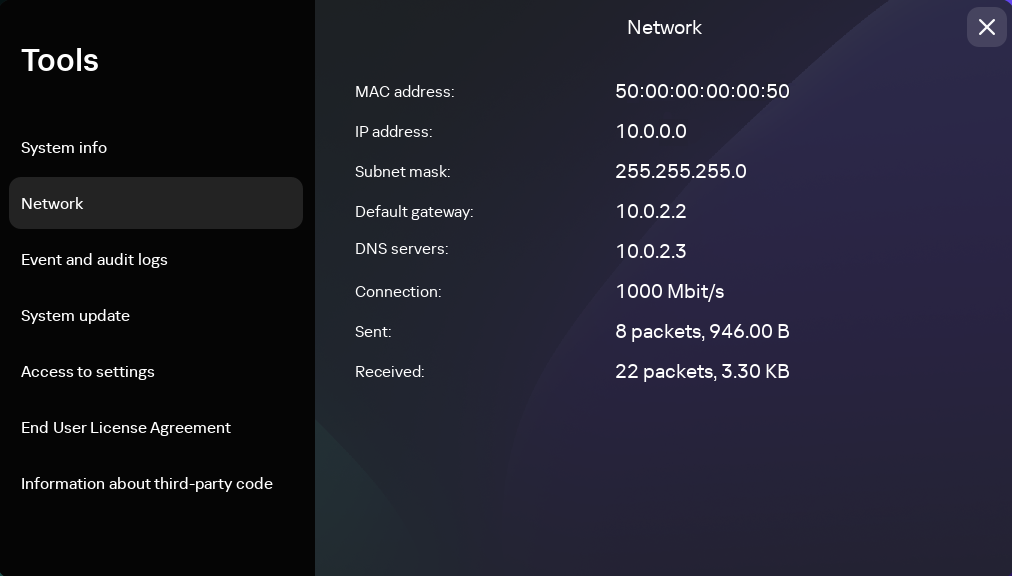
Tools. Network section
Page top