Search window
You can search for indicators, contained in log files, in Kaspersky Lab feeds by means of Splunk. For this purpose, use macros from the app in a search.
For example, you can specify the following search request:
index="main" | where isnotnull(ip) | `kl_ip_reputation_lookup(ip)`
This command lets you search for indicators contained in log records whose index is main; these records contain the ip field; the value in the ip field is searched for in IP Reputation Data Feed.

New search
If you want to display original events whose indicators were detected, use the _raw string in a search request after macros. For example, edit the above search request as follows:
index="main" | where isnotnull(ip) | `kl_ip_reputation_lookup(ip)` _raw
If you want a search to be performed regularly, you can create an alert.
To create an alert on the basis of a search:
- In Splunk, on the Apps bar click Search.
- Perform a search that you want to be made regularly.
For example, it can be the search described above (with the request
index="main" | where isnotnull(ip) | `kl_ip_reputation_lookup(ip)`). - Click Save As and in the drop-down list select Alert.
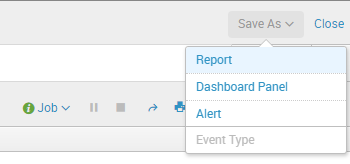
Saving an alert
- Configure the alert:
- Specify the alert name.
- Specify how frequently the search is to be performed.
- Specify the target for the search result.
For example, the search result can be sent by email, or displayed in Splunk.
For more information on how to create an alert, refer to Splunk documentation at https://www.splunk.com/view/SP-CAAAGYG.
Page top