Performing the verification test
This section explains how to check the capabilities of Kaspersky Threat Feed App for ThreatConnect by performing the verification test.
About the verification test set
The verification test set is a collection of indicators with URLs, IP addresses, and hashes that are always present in Kaspersky Threat Feed App for ThreatConnect.
The following table summarizes the contents of the verification test set for commercial feeds.
Verification test set (commercial feeds)
Data feed used |
Objects |
Assigned tags |
Feed fields used in tags |
Malicious URL Data Feed |
http://fakess123.nu http://badb86360457963b90faac9ae17578ed.com |
Kaspersky, Malicious_URL |
category |
Phishing URL Data Feed |
http://vofer2.ru http://bigt2.site |
Kaspersky, Phishing_URL |
industry |
Botnet C&C URL Data Feed |
http://fakess123bn.nu http://a7396d61caffe18a4cffbb3b428c9b60.com |
Kaspersky, Botnet_CnC_URL |
threat |
IP Reputation Data Feed |
192.0.2.0 192.0.2.3 The values indicated may be included in ThreatConnect exceptions (see details in section "About Data Feeds as ThreatConnect exceptions" below). |
Kaspersky, IP_Reputation |
category, files/threat |
Malicious Hash Data Feed |
FEAF2058298C1E174C2B79AFFC7CF4DF 44D88612FEA8A8F36DE82E1278ABB02F C912705B4BBB14EC7E78FA8B370532C9 |
Kaspersky, Malicious_Hash Kaspersky, Malicious_Hash |
threat, file_type |
Mobile Malicious Hash Data Feed |
60300A92E1D0A55C7FDD360EE40A9DC1 |
Kaspersky, Mobile_Malicious_Hash |
threat |
Mobile Botnet Data Feed |
001F6251169E6916C455495050A3FB8D |
Kaspersky, Mobile_Botnet |
category, threat |
Ransomware URL Data Feed |
http://4securityserverjiksnetworksystem02.tk http://newscommer.com |
Kaspersky, Ransomware_URL |
files/threat |
Malicious URL Exact Feed |
http://fakess123.nu http://badb86360457963b90faac9ae17578ed.com |
Kaspersky, Malicious_URL_Exact |
category, files/threat |
Phishing URL Exact Feed |
http://vofer2.ru http://bigt2.site |
Kaspersky, Phishing_URL_Exact |
industry |
ICS Hash Feed |
7A8F30B40C6564EFF95E678F7C43346C 44D88612FEA8A8F36DE82E1278ABB02F |
Kaspersky, ICS_Hash |
file_type, threat |
IoT URL Feed |
http://e593461621ee0f9134c632d00bf108fd.com/.i |
Kaspersky, IOT_URL |
files/threat |
APT Hash Feed |
7A2E65A0F70EE0615EC0CA34240CF082 |
Kaspersky, APT_IP |
- |
APT IP Feed |
192.0.2.4 The values indicated may be included in ThreatConnect exceptions (see details in section "About Data Feeds as ThreatConnect exceptions" below). |
Kaspersky, APT_IP |
- |
APT URL Feed |
http://b046f5b25458638f6705d53539c79f62.com |
Kaspersky, APT_URL |
- |
Vulnerability Feed |
D8C1F5B4AD32296649FF46027177C594 |
Kaspersky, Vulnerability |
exploits/threat |
ICS Vulnerability Feed |
D8C1F5B4AD32296649FF46027177C594 |
Kaspersky, ICS_Vulnerability |
exploits/threat |
Botnet C&C URL Exact Feed |
http://fakess123bn.nu http://a7396d61caffe18a4cffbb3b428c9b60.com |
Kaspersky, Botnet_CnC_URL_Exact |
threat |
The following table summarizes the contents of the verification test set for demo feeds.
Verification test set (demo feeds)
Data feed used |
Objects |
Assigned tags |
Demo Botnet C&C URL Data Feed |
http://5a015004f9fc05290d87e86d69c4b237.com http://fakess123bn.nu |
Kaspersky, Demo_Botnet_CnC_URL |
Demo IP Reputation Data Feed |
192.0.2.1 192.0.2.3 The values indicated may be included in ThreatConnect exceptions (see details in section "About Data Feeds as ThreatConnect exceptions" below). |
Kaspersky, Demo_IP_Reputation |
Demo Malicious Hash Data Feed |
776735A8CA96DB15B422879DA599F474 FEAF2058298C1E174C2B79AFFC7CF4DF 44D88612FEA8A8F36DE82E1278ABB02F |
Kaspersky, Demo_Malicious_Hash Kaspersky, Demo_Malicious_Hash |
Performing the verification test
The verification test is a procedure that is used to check the capabilities of Kaspersky Threat Feed App for ThreatConnect and to confirm the accuracy of the integration.
You must perform the verification test for each feed available with your certificate.
To perform the verification test:
- Sign in to ThreatConnect.
- On the menu bar, select the magnifying glass (
 ).
).The Search view opens.
- In the Search field, copy the contents of the Objects column from the Verification test results table above.
- In the Filters field, switch on the Local Matches Only slider.
- Click the light gray magnifying glass (
 ) .
) .The view will show the results of the analysis.
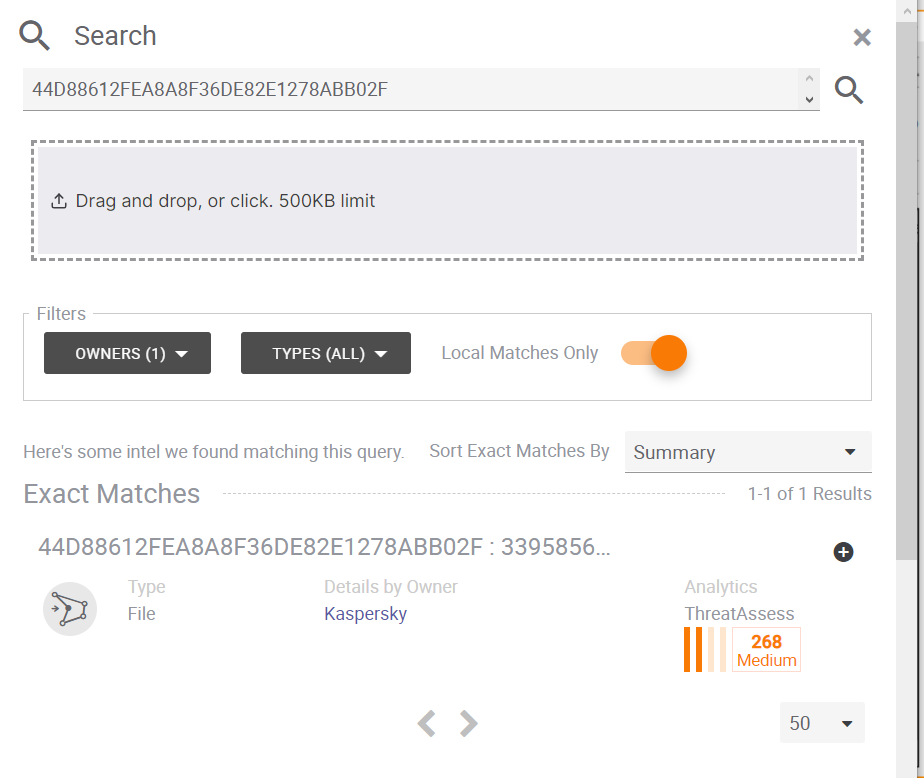
Search view
- In the results of the analysis click each test result.
A view with detailed information will open.
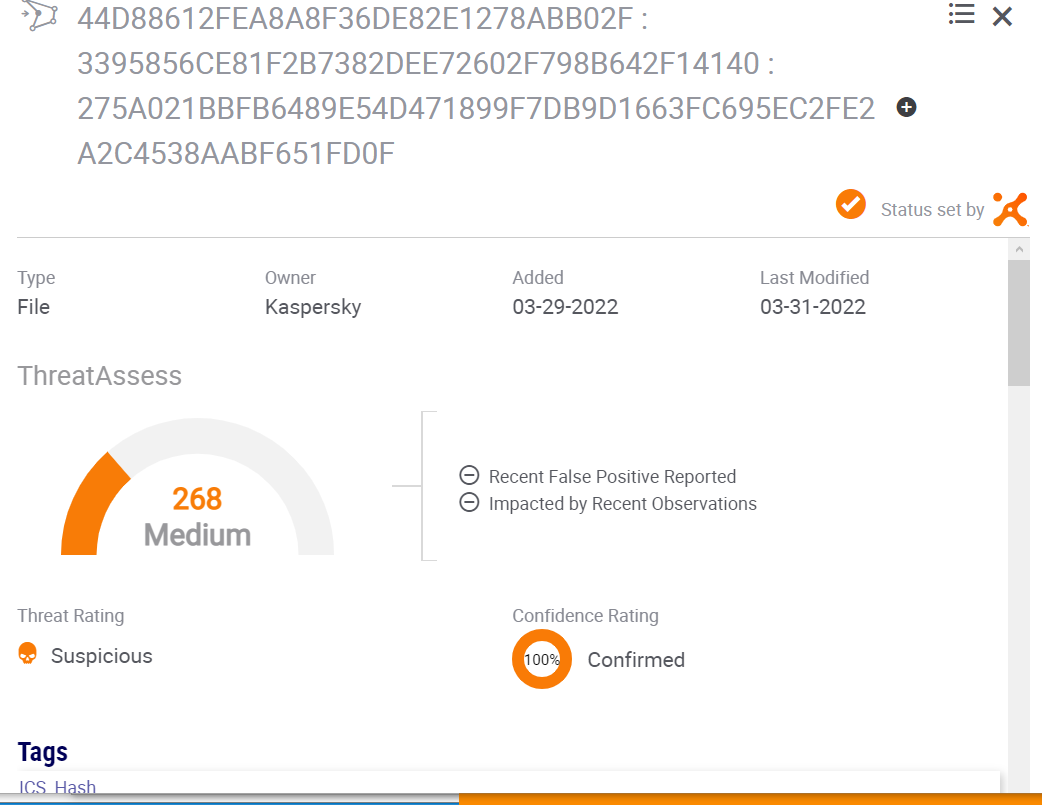
Detailed information for each test result
- Compare the analysis results to the information in the above Verification test results table:
- All objects must be detected.
For example, if an entry for a feed in the Verification test results table lists two IP addresses, the analysis results must contain two entries.
- The specified tags for objects must be present.
For example, if an entry for a feed in the Verification test results table lists "Kaspersky, Phishing_URL", the analysis results must contain these tags: "Kaspersky" and "Phishing_URL".
- All objects must be detected.
About Data Feeds as ThreatConnect exceptions
The object values for IP Reputation Data Feed, Demo IP Reputation Data Feed, and APT IP Data Feed are the ThreatConnect exceptions (the exceptions refer only to the test entries of the feed objects available in the Verification test results table).
For this reason, such indicators are not imported to ThreatConnect, and they are not used for verification. Instead, if you use one of the feeds mentioned, go to Browse -> Indicators, select the Advance search mode, and then enter the following:
tag = "IP_Reputation"(for IP Reputation Data Feed)tag = "Demo_IP_Reputation"(for Demo IP Reputation Data Feed)tag = "APT_IP"( for APT IP Data Feed)
Make sure the indicators are available as imported.
Page top