Considerations when interfacing with a network
Entities in KasperskyOS can use the standard interface of Berkeley sockets. To do so, you only need to add a few additional steps when building the solution.
Bear in mind that entities in KasperskyOS refer to applications and their associated processes (details about entities).
Interfacing with a network in KasperskyOS
In KasperskyOS, you can interface with a network via a separate entity named vfs_entity. Calls of standard POSIX functions for working with sockets are converted into calls of vfs_remote library functions. This library makes IPC requests to vfs_entity. The vfs_server server library receives the IPC request and calls the corresponding network driver.
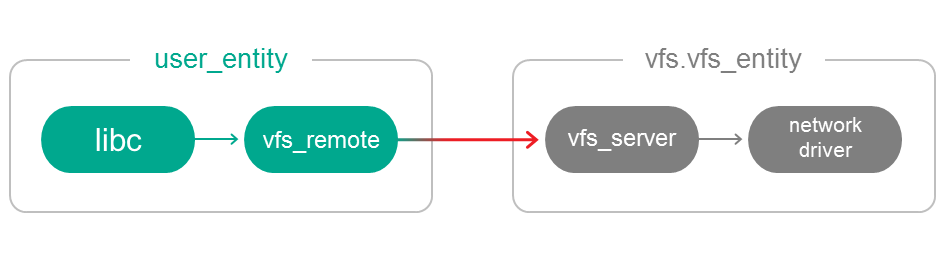
The vfs_remote library and vfs_entity are provided in the SDK. The vfs_entity is already linked to the vfs_server library and the network driver required for running a solution in QEMU.
Therefore, you can interface with the network the usual way by calling standard POSIX functions, for example, from sys/socket.h and netinet/in.h. However, there are certain considerations when building a solution.
Special features of building a solution
To enable usr_entity to interface with a network, it must be linked to the vfs_remote library and connected to vfs_entity. The connection must be named VFS.
The einit entity is used to create connections between entities and to start entities.
To enable entity A to call methods of entity B, you must not only start both entities but also create a connection from A to B. To do so, you need to indicate the following in the init.yaml file:
# Start B- name: B# Start A- name: A connections: # Create a connection from A to B - target: B # Name of the new connection: some_connection_to_B id: some_connection_to_B
The following must be indicated in the init.yaml file:
entities:
- name: vfs.vfs_entity
- name: usr_entity
connections:
- target: vfs.vfs_entity
id: VFS
When the solution is loaded, the einit entity built from the init.yaml file will start the vfs_entity and usr_entity, and connect usr_entity with vfs.vfs_entity. Name of the created connection: VFS. vfs_entity is located in the vfs folder, therefore it is specified as vfs.vfs_entity in the init description.