Operating principle of the application
The Kaspersky Anti Targeted Attack Platform application includes two functional units:
- Kaspersky Anti Targeted Attack (hereinafter also referred to as "KATA"), which detects threats on the perimeter of the enterprise IT infrastructure.
- Network Detection and Response (hereinafter also referred to as "NDR"), which provides protection of the corporate LAN.
You can use the full functionality of the application (KATA+NDR key) as well as partial functionality (only the KATA key).
Principle of operation of Kaspersky Anti Targeted Attack
Kaspersky Anti Targeted Attack includes the following components:
- Sensor.
- Central Node.
- Sandbox.
- Endpoint Agent (optional, for scanning files in Sandbox).
Sensor, Central Node and Sandbox interoperate as follows:
- The Sensor component receives mirrored SPAN, ERSPAN, RSPAN traffic, objects and metadata of HTTP, FTP, SMTP, and DNS protocols, HTTP and FTP traffic data, as well as HTTPS traffic data (if the administrator has configured SSL certificate replacement on the proxy server), copies of email messages, and does the following with the obtained data:
- Scans Internet traffic for signs of intrusion into the corporate IT infrastructure using the Intrusion Detection System technology (hereinafter also referred to as IDS).
IDS technology can recognize and detect network activity in 80 protocols, particularly in 53 application layer protocols of the TCP/IP model, detecting suspicious traffic and network attacks. Supported protocols include TCP, UDP, FTP, TFTP, SSH, SMTP, SMB, CIF, SSL, HTTP, HTTP/2, HTTPS, TLS, ICMPv4, ICMPv6, IPv4, IPv6, IRC, LDAP, NFS, DNS, RDP, DCERPC, MS-RPC, WebSocket, Citrix and others.
- Checks the reputation of files and URLs against the Kaspersky Security Network database (hereinafter also referred to as "KSN") or Kaspersky Private Security Network (hereinafter also referred to as "KPSN").
- Sends objects and files to be scanned by the Central Node component.
You can also use a mail sensor as a Sensor component, which is a server or virtual machine on which Kaspersky Secure Mail Gateway (KSMG) or Kaspersky Security for Linux Mail Server (KLMS) is installed.
- Scans Internet traffic for signs of intrusion into the corporate IT infrastructure using the Intrusion Detection System technology (hereinafter also referred to as IDS).
- The Central Node component scans files and objects using anti-virus databases, YARA rule databases created by Kaspersky Anti Targeted Attack users, and if necessary, sends files and objects to be scanned by the Sandbox component.
- The Sandbox component analyzes the behavior of objects in virtual operating systems to detect malicious activity and signs of targeted attacks on corporate IT infrastructure, and sends scan results to the Central Node server.

If any threats are detected, the Central Node server records relevant information in the alert database. You can view the alert table in the Alerts section of the application web interface or by generating an alert report.
Alert information can also be published to a SIEM system that is used in your organization, as well as external systems. Information on Sandbox component alerts can be published in the local reputation database of Kaspersky Private Security Network.
The principle of operation of Kaspersky Anti Targeted Attack Platform is shown in the following picture.
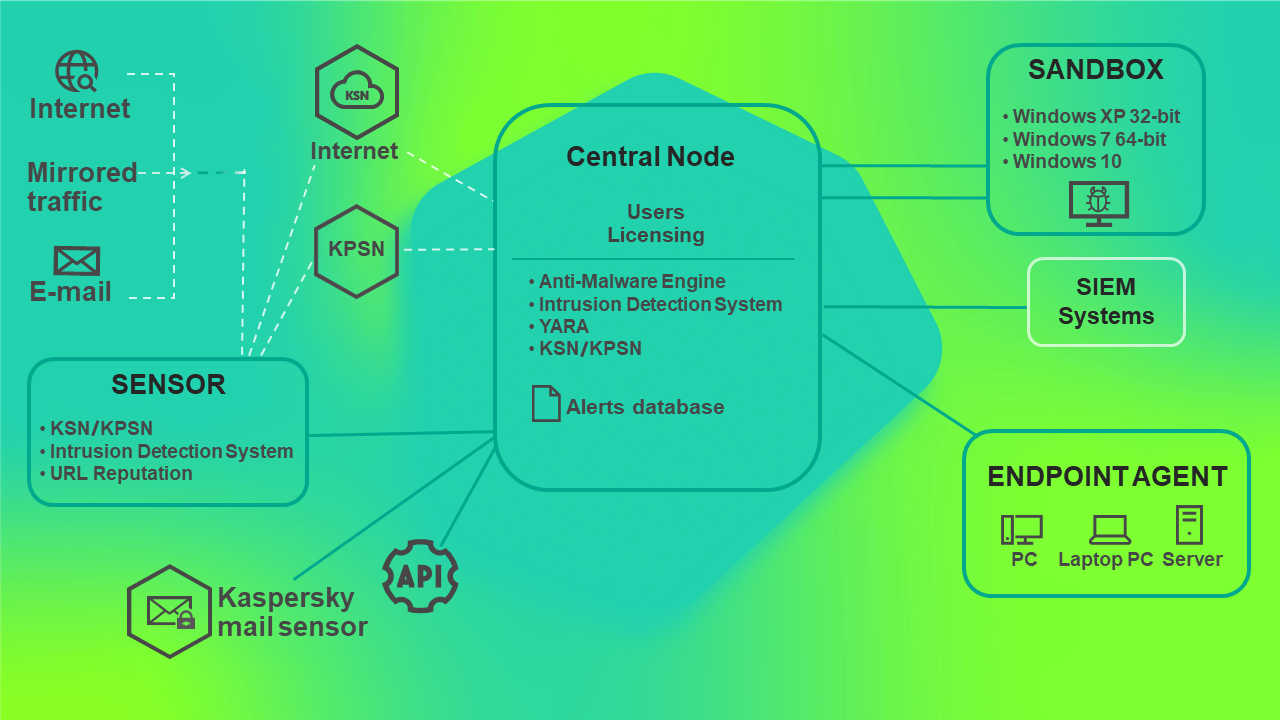
Principle of operation of Kaspersky Anti Targeted Attack Platform
You can configure settings of each Central Node component individually or manage several components in a centralized way in distributed solution mode.
A distributed solution is a two-tier hierarchy of Central Node servers. This structure sets apart a primary control server known as the Primary Central Node (PCN) and secondary servers known as Secondary Central Nodes (SCN).
The principle of operation of Kaspersky Anti Targeted Attack Platform in distributed solution mode is shown in the following picture.
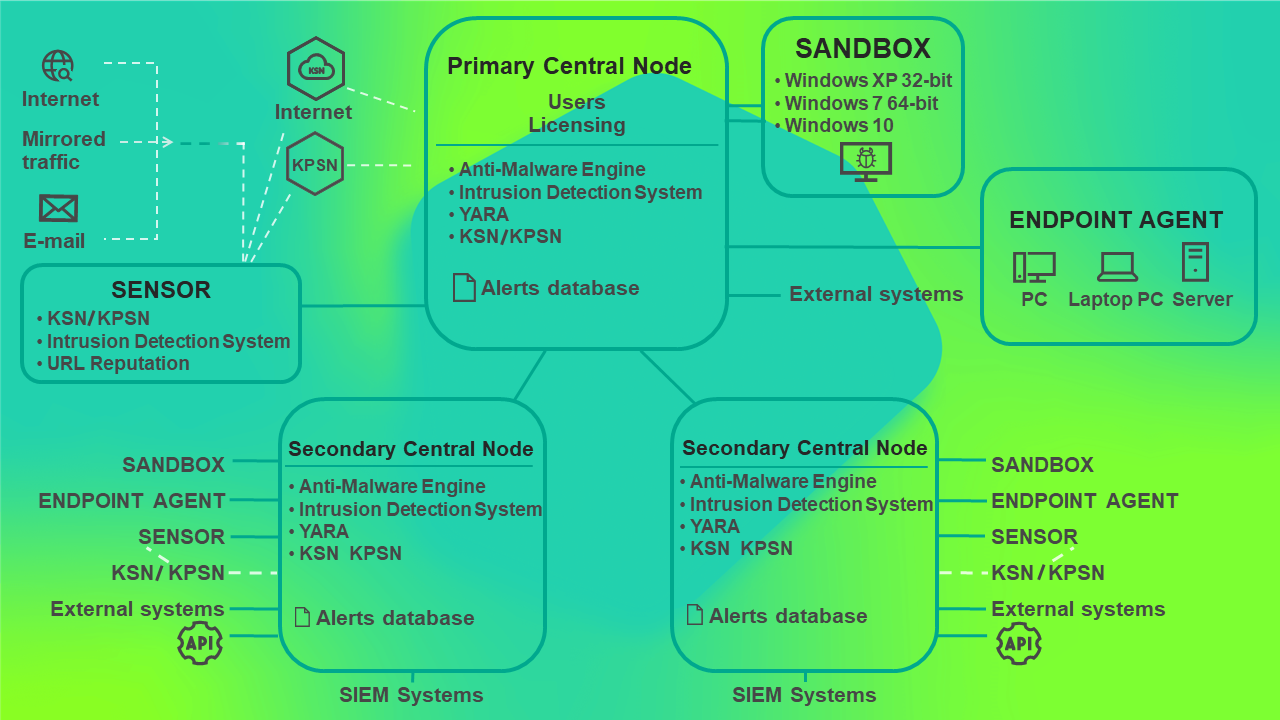
Principle of operation of Kaspersky Anti Targeted Attack Platform in distributed solution mode