Support for AM-PPL technology
Kaspersky Embedded Systems Security supports Antimalware Protected Process Light technology (hereinafter referred to as "AM-PPL") from Microsoft. AM-PPL protects Kaspersky Embedded Systems Security processes against malicious actions (for example, terminating the application). AM-PPL allows only trusted processes to run. Kaspersky Embedded Systems Security processes are signed in accordance with Windows security requirements, and therefore they are trusted. For more details about AM-PPL technology, please visit the Microsoft website. AM-PPL technology is enabled by default.
Kaspersky Embedded Systems Security also has built-in mechanisms for protecting application processes. AM-PPL support lets you delegate process security functions to the operating system. You can thereby increase the speed of the application and reduce the consumption of computer resources.
The application registers the Kaspersky Embedded Systems Security (AVP) service and the Kaspersky Seamless Update Service (AVPSUS) service. The AM-PPL technology protects only the AVP service.
Keep the AM-PPL technology always active. AM-PPL is an important component of the operating system's defenses. It is permissible to disable AM-PPL only in a separate testing environment for the purpose of troubleshooting the application.
AM-PPL technology is available for Windows 10 version 1703 (RS2) or later, and Windows Server 2019 operating systems.
To enable or disable AM-PPL technology:
- Turn off the application's Self-Defense mechanism.
The Self-Defense mechanism prevents modification and deletion of application processes in the computer memory, including changing the AM-PPL status.
- Run the command line interpreter (cmd) as an administrator.
- Go to the folder where the Kaspersky Embedded Systems Security executable file is located.
- Type the following in the command line:
klpsm.exe enable– enable support for AM-PPL technology.klpsm.exe disable– disable support for AM-PPL technology.
- Restart Kaspersky Embedded Systems Security.
- Resume the application's Self-Defense mechanism.
As a result, when a user attempts to stop the AVP service, a system window with an error message appears. The user can only manage application services from the Kaspersky Embedded Systems Security interface.
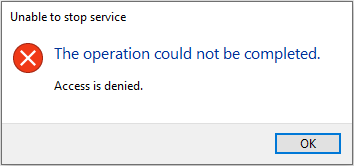
Application services access error
Page top