Configuring a cluster in Microsoft AKS
This section explains how to create and configure a cluster in Microsoft Azure Kubernetes Service.
To deploy Kaspersky Scan Engine Docker images to Microsoft AKS, a cluster must be present. If there is no cluster or if the existing clusters cannot be used for Kaspersky Scan Engine, perform the actions below.
To create and configure a cluster in Microsoft AKS:
- In the Azure management console, select Microsoft Azure Kubernetes services.
- Select Create a Kubernetes cluster.
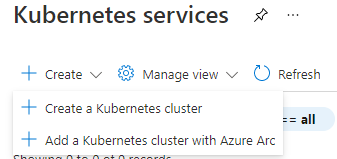
Create menu in Kubernetes services
The Cluster configuration window opens.
- Select the resource group that will contain the new registry.
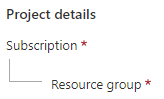
Project details
- In the Cluster details section, specify the following settings:
- Kubernetes cluster name, for example,
scanengine. - Region. The same region that you chose when creating the new Azure Container Registry.
- Kubernetes version to work with a cluster. Specify
1.19.11. - Optionally, specify other settings.
- Kubernetes cluster name, for example,
- In the Primary node pool section, specify the following settings:
- In the Node size section, select a node that with the following parameters or better: 2 CPU, 4 GB of RAM, 8 GB of temporary storage.
- In the Node count, specify the necessary number of nodes. One node is enough to verify the correctness of your Kaspersky Scan Engine integration.
- In the Integrations section, Container registry field, specify the registry to which you imported the Kaspersky Scan Engine Docker image. See section "Importing the Kaspersky Scan Engine Docker image in Microsoft ACR".
- Optionally, specify other settings.
- Click Create.
After these actions are performed, the Kubernetes cluster with Node Group will be available in Microsoft AKS, so you can deploy Kaspersky Scan Engine.
Page top