Web interface of the Kaspersky Appicenter for Developers portal
The web interface of the Kaspersky Appicenter for Developers portal contains the following elements (see the figure below):
- control panel for the Kaspersky Appicenter interface and account management at the top of the window
- main menu in the left part of the window
- workspace in the right part of the window
The content of the main menu and workspace may differ depending on your role in the portal.
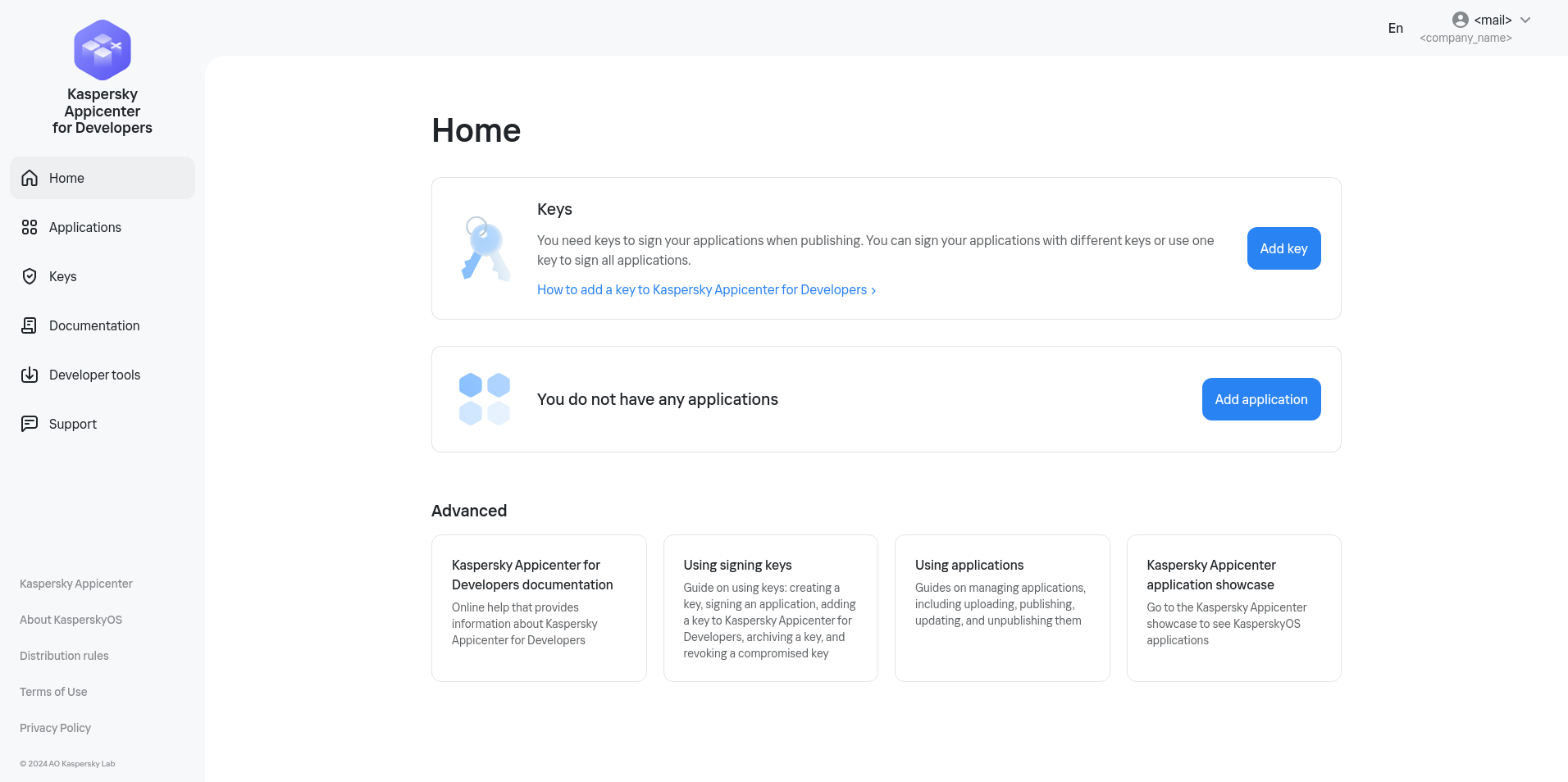
Web interface of the Kaspersky Appicenter for Developers portal (for a user with the distributor role)
Control panel
The top of the web interface window has a control panel containing the following elements:
- Toggle switch for selecting the interface language of Kaspersky Appicenter.
You can change the interface language of Kaspersky Appicenter by clicking the toggle switch and selecting your desired language from the drop-down list.
- Information about your account (email address and name of the company associated with your account).
- User menu, which lets you do the following:
- Go to your Kaspersky Account page.
- Terminate the portal session.
Main menu
Using the main menu, you can go to the following sections of the portal:
- Home. In this section, you can navigate to the main portal functions available for your role.
- Applications. In this section, you can manage applications: add new applications, view added applications and their publication status, and update applications.
This functionality is only available to users with the distributor role.
- Keys. In this section, you can manage keys: add the public part of a key pair (known as the public key) and view added public keys.
This functionality is only available to users with the distributor role.
- Documentation. In this section, you can go to the documentation for the portal.
- Developer tools. In this section, you can view information about KasperskyOS-based platforms and get the necessary developer tools for creating applications.
- Support. In this section, you can learn how to contact Technical Support to report a problem, ask a question, or submit a suggestion about the operation of Kaspersky Appicenter for Developers.
You can also view information about Kaspersky Appicenter for Developers and the KasperskyOS operating system through the main menu:
- Kaspersky Appicenter. You can go to the Kaspersky Appicenter application showcase, where you can view all published applications. The application showcase is located at https://os.kaspersky.com/appicenter/.
- About KasperskyOS. You can go to the website for the KasperskyOS operating system, which provides general information about the operating system.
- Distribution rules. You can view the Kaspersky Appicenter rules and requirements for uploaded application information.
- Terms of Use. You can read the Terms of Use for the Kaspersky Appicenter for Developers portal.
- Privacy Policy. You can read the Kaspersky Appicenter for Developers Privacy Policy.
Workspace
The workspace displays the content and information of the section that you selected in the main menu.
Page top