Unlocking Windows
The Windows Unlocker utility detects and deletes Windows lockers.
We recommend using the Windows Unlocker utility after scanning the computer using Kaspersky Rescue Tool. If the scan does not unlock the computer, you can run the Windows Unlocker utility. The Windows Unlocker utility may make your operating system inoperable.
To unlock the operating system:
- Boot from the Kaspersky Rescue Disk.
After starting, Kaspersky Rescue Disk automatically runs the application for scanning the computer.
- Start Kaspersky Rescue Tool.
The main window of Kaspersky Rescue Tool is displayed.
- Select the Tools tab.
Kaspersky Rescue Tool displays the list of utilities.
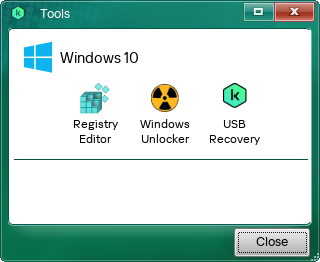
Kaspersky Rescue Disk utilities
- Select the Windows Unlocker utility.
- This opens a window; in that window, click Start scan.
The Windows Unlocker utility scans the registry and displays a list of keys that the utility proposes to modify.
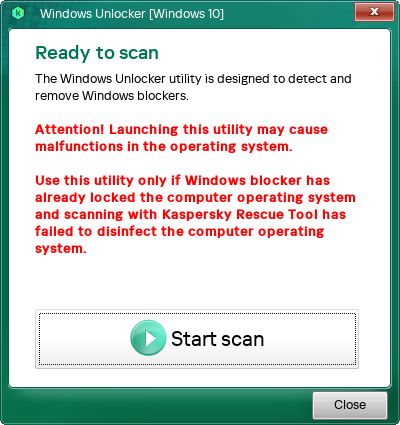
Windows Unlocker
- Click OK.
The utility creates a file with registry keys that the utility is about to modify. This is necessary to be able to restore the registry if the utility makes the operating system inoperable.
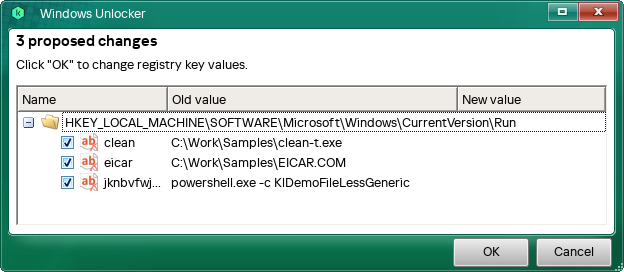
Results of the Windows Unlocker utility
- Save the file with registry keys.
- Click Close.